
Home > GPS Tracking System | Small Covert GPS Device > Asset Tracking with GPS > P-Trac Pro GPS+ Tracking Device Works Anywhere - Even Inside Buildings

A Tiny GPS Tracking Device Will Work Inside Buildings For Over 20 Days


P-Trac Pro GPS+ Tracking Device Works Anywhere - Even Inside Buildings - Click to enlarge
Item #: 069-HW-dev-PTrac82-wSmBatt
Retail Price: $1,000.00
You Save 30%

Our Sale Price: $699.95

  • Long Battery Life Up To 21 Days Of Use On A Single Battery Charge
  • Durable Construction Sturdy Construction Can Take A Beating
  • GPS + AGPS Only Covert GPS Unit In The World Works Inside Buildings And Obstructed Areas
  • Small Sized This Unit Is Small Enough To Fit Inside Your Child's Stroller, Jacket, Bookbag, Purse, Or In A Glove Compartment.
  • Panic Button Option Lets People Know You Are In Trouble For Fast Emergency Response.

Covert GPS Tracking Device Can Be Hidden Anywhere

The P-Trac Pro is a small, sturdy, portable tracking device, at about 3 inches long it's about the size of a pager. With an internal antenna and rechargeable battery it requires no external connections, making it easy to conceal within a child's jacket or stroller. It operates on the CDMA wireless network, providing nationwide coverage.

Home Page

Based on the "GPS One" Assisted GPS (AGPS) technology, the P-Trac Pro has receiver sensitivity up to 20 dB higher than other GPS based devices. This higher location performance, combined with the ability to fall back to the CDMA network, allows for positioning information from locations not previously viable like: inside car garages, vehicles, trailers, warehouses, buildings, and large city "urban canyons" where tall buildings and other edifices block GPS signals.

Perfect For Locating A Child's Toy or Stroller When Near

Intelligent Alerts
Intelligent GPS Alerts
tell you when the device has entered a restricted area or strayed too far outside a safe zone. You draw the circle on the map and the unit will alert you when it enters or exits the area. Get an alert on your cell phone if your Teen driver is too far from home or enters into a dangerous neighborhood.

Logistics and Cost Control
The ability to track a high value package or equipment and accurately determine its location is the key to minimizing lost, misplaced or stolen assets. This leads to lower costs by increased throughput and productivity, as well as, reduced workforce costs by reducing the number of staff required for package tracking and inventory management.

Easy 3 Step P-Trac Pro Use


P-Trac Pro GPS+ Tracking Device Works Anywhere - Even Inside Buildings

Item #: 069-HW-dev-PTrac82-wSmBatt
Retail Price: $1,000.00
You Save: 30%
Sale Price: $699.95
Battery: 
Panic Button: 
Activation: 
Charger Type: 
Qty.
Emergency Locate On Demand PlanEmergency Locate On Demand Plan
$14.95
30 locates per month service30 locates per month service
$29.95
750 locates per month service750 locates per month service
$44.95
1500 locates per month service1500 locates per month service
$59.95
3000 locates per month service3000 locates per month service
$79.95
Additional 7 day batteryAdditional 7 day battery
$119.95
Additional 21 day batteryAdditional 21 day battery
$149.95
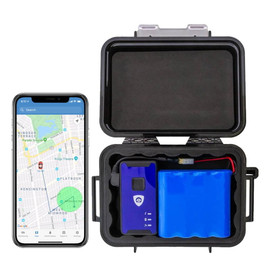
Slap & Track WeatherProof Magnetic Case BIG (21 Day)Slap & Track WeatherProof Magnetic Case BIG (21 Day)
$59.95
P-Trac Adult Ankle Bracelet (MEDIUM)P-Trac Adult Ankle Bracelet (MEDIUM)
$39.95
P-Trac Wristband (MEDIUM SIZE)P-Trac Wristband (MEDIUM SIZE)
$39.95
P-Trac Deluxe Leg Band (LARGE SIZE)P-Trac Deluxe Leg Band (LARGE SIZE)
$39.95
Ptrac Pro Single Station Battery Charger Ptrac Pro Single Station Battery Charger
$89.95
Six Station PTrac Battery ChargerSix Station PTrac Battery Charger
$699.95

Features:

  • Single point locate - Low cost usage as needed
  • Real-time tracking - High frequency tracking mode assists with theft recovery
  • Scheduled tracking - Sends out an automated locate on a schedule
  • Zone alert - Sends an alert if the beacon reports outside an allowed zone
  • Small, rugged and portable - Can be discreetly inserted into a variety of package sizes
  • Hybrid-assisted GPS system - Can be located where conventional GPS fails, even indoors
  • Extended battery life - Up to 10 days on a single charge
  • Internal antennas - Completely self contained, unlike traditional GPS tracking beacons
  • Uses cellular and PCS channels - Available to approximately 90% of US population
  • Operates on existing cellular E911 GPS reference service - Robust network ensures reliable performance

Online Tracking Service Features:

  • Unlimited Access to monitoring and reporting features
  • Multi User access with unique user name and password
  • Multiple Geo Fences set by street address or Lat-Long and Radius
  • Automatic Alerts by e-mail or cell phone text message
  • Locations on demand at the click of a mouse
  • Schedule management of automatic locates
  • Auto Tracking via scheduled location pings down to every 5 minutes
  • Reporting of all activity for power full analysis
  • Google Earth integration for satellite photos

Purchase of this GPS system constitutes agreeing to the monthly service fees, activation fees chosen upon sale as well as any overages that might incur. To cancel the service, simply notify us by the 20th of the month to avoid the next cycle billing for the following month.

Three Great Service Plan Options With NO Long Term Commitment:

Emergency Locate on demand for asset recovery - Request a location online only when you need one. Recover stolen goods or find a lost person.


Screen Shot Virtual View

Screen Shot Reports View

Three great service plan options with NO long term commitment:

Emergency Locate on demand for asset recovery - Request a location online only when you need one. Recover stolen goods or find a lost person.

    • One Time Activation: $69.95 per unit
    • 30 location requests per month $29.95
    • Additional Locates are $4.95 in blocks of 10

Tracking level one for tracking history and zone alerts. Set the unit to auto locate once each hour 24/7 or what ever schedule you choose and record the activity for later review.

    • One Time Activation: $69.95 per unit
    • 750 location requests per month $49.95
    • Additional Locates are $6.95 in blocks of 50

Professional Tracking Package High volume tracking history and zone alerts. Let the unit auto locate every 30 minutes 24/7 or what ever schedule you set and record the activity for you.

    • One Time Activation: 69.95 per unit
    • 1500 location requests per month $74.95
    • Additional Locates are $6.95 in blocks of 50

High Volume Tracking Package The ultimate in high volume tracking history and zone alerts. Let the unit auto locate every 15 minutes 24/7 or what ever schedule you set and record the activity for you.

      • One Time Activation: $69.95 per unit
      • 3000 location requests per month $99.95
      • Additional Locates are $9.95 in blocks of 50


Back to Top
 
Ask a question about this item.
Email this page!


dealer


dealer


 Featured Products 
W-Trac GPRS with 15 Second Updates
Livewire FastTrac Real-Time GPS Tracker
P-Trac Micro - Tiny GPS Tracker works indoors
W-Trac GPRS with 15 Second Updates

Battery operated small GPS tracking device that can give you 15 second update intervals for over 6 hours! Unbelievable! Only $49.95 For UNLIMITED TRACKING. Simply the best compact, easy-to-use GPS tracking device available for short term tracking! Use with optional motion sensor for 90 day battery life!!

Livewire FastTrac Real-Time GPS Tracker

This GPS Tracking Device with blazing fast 10 second updates, is rechargeable battery powered and completely covert. With unlimited tracking and no contracts, this Real-Time GPS Tracking device has a built-in motion sensor to track for up to 10 continuous days.

P-Trac Micro - Tiny GPS Tracker works indoors

The smallest real-time GPS Tracking device using AGPS in the world. This small AGPS Tracker works inside and outside - even INSIDE buildings. Perfect for locating assets or people. Act Now And Get A $100 Rebate!

Our Sale Price: $549.00$399.95
W-Trac GPRS with 15 Second Updates
View All Asset Tracking >>
$100 Ultra-Rebate: See It Today
Livewire FastTrac Real-Time GPS Tracker
View All Real-Time GPS Tracking >>
$349.95* THIS WEEK ONLY (after rebate)
P-Trac Micro - Tiny GPS Tracker works indoors
View All Asset Tracking >>


Circle of Certainty (Location Accuracy)

\The Circle of Certainty represents a measure of accuracy for each locate point from your Ptrac Pro . If you beacon is in a good signal environment where it can receive abundant GPS signals, the circle around the beacon icon will be small, indicating that the location is highly accurate, and that there is a 95% probability that your beacon is within that circle. As your beacon moves into more challenging GPS environments, the size of the circle will increase, indicating a larger degree of error in the location calculation. While more error may not be ideal for all applications, the advantage is that in these challenging signal environments the Ptrac Pro is able to calculate a locate, whereas other GPS devices will simply fail.
The size of the circle will be small or large depending on how the location is being calculated. Rough guidelines are as follows:


Accuracy

Fix Type

Location Calculation

Typical Environment

0 – 50 yards

GPS fix

The beacon is receiving abundant GPS signals

Outdoors

51 to 300 yards

Assisted GPS fix

The beacon is receiving partial GPS signals. The location calculation is being aided by the cellular network.

Partially indoors, or in an obstructed environment (metal roof, heavy foliage, inside a vehicle).

301 yards or greater

Cell tower fix

No GPS signals are available. The location calculation is being completed entirely by the cellular network.

Indoors or in a completely obstructed environment.


Setting up Automated Reports and Scenarios

Overview of Scenarios

Scenarios allow you to remotely program the functionality of your beacon through your web interface. Within the Scenario Manager, you create Scenarios, which are made up of Events, Schedules and Notification Groups. Each component of a scenario acts like a building block that can be created once and reused across a variety of scenarios. For example, the Scenario Manager can help you create scenarios to track your assets during scheduled times, to generate a notification of a zone violation, or to alert you if the battery is low. See the Example Scenarios section for more ideas on how to use the Scenario Manager.
To create a Scenario, you must first create an Event, a Schedule, a Contact, and a Notification Group. You then associate these components together, creating a complete Scenario. Once a scenario is created, it can be assigned to one or more items at any one time.

Events

The Ptrac Pro supports the following events:

  • Interval Tracking: defines the interval at which the Ptrac Pro will automatically report its location. Note that increasing the frequency of the tracking interval will increase the number of messages used, and decrease the battery life.
  • Zone Monitoring: set the area where your beacon is allowed or not allowed to be. Each time the beacon reports a position, the system will check to see if it is inside or outside of the zone. Note that an interval tracking scenario must be assigned to the Ptrac Pro in order for Zone Monitoring to operate.
  • Status Report: set the frequency with which the beacon will report its status. Increasing the reporting frequency of the status will improve how quickly you will detect a low-battery situation, but this will also have a slight negative impact on the battery life.

To create an event in the portal, navigate to the Administration tab, select the Scenarios link on the left, and then click on the Events tab. Click add event to create a new event, and then follow the on-screen instructions.

Schedules

The Scheduling module allows you to create a variety of schedules to meet your needs. Schedules can be set for a simple one-time schedule, recurring schedules, or an all-the-time schedule for 24/7 operation.
Once in the Scenario Manager section of the portal, click on the Schedules tab, and click the add schedule button to create a new schedule.

Contacts and Notification Groups

Notification Groups allow you to set up different groupings of contacts that can be alerted via email or cell phone text message in the event that your beacon violates your set parameters. Notification Groups are made up of various Contacts, which must be set up first.
To create a Contact, navigate to the Administration tab, select the Contacts link on the left, and then click on the new contact button. Fill in the appropriate contact information.
Once you have created your necessary contacts, click on the new notification group button and follow the on screen steps to create your group. Note that you must create a notification group if you wish to receive alerts from the system. Even if you only wish for a single contact to receive the alert, you still must create the group for the single contact.
If you do not wish to be notified of scenario events (eg. you just want data to be stored in the database for review), then you do not need to set up any contacts or notification groups.

Creating a Scenario

Once you have created the necessary Events, Schedules and Notification Groups, you must tie them together in a Scenario. To do this, navigate to the Scenario Manager section, and click on the Scenarios tab. Click on the add scenario button and follow the on screen steps. You will notice that your named Events, Schedules and Notification Groups all appear in the drop lists on this page. If you did not set up any notification groups, then “Store for Review” will be available as the only choice of notification group. Choose the appropriate selections and click on the save button to save your Scenario.
When the page refreshes you will have the option to assign your scenario to one or more assets. Click on the assign items link, and then simply check the boxes to the left of each asset you wish to assign, and click on the assign button. When you are finished click the done button to return to the main Scenario page.
Repeat these steps for each Scenario you wish to create. For additional information on how to configure scenarios, please consult the online help system.

Example Scenarios

Below you will find some examples of scenarios you could create with the scenario manager module.

  • Create an interval tracking scenario to track your assets every 60 minutes (event) from 8am to 5pm, Monday through Friday (schedule) with each locate point being stored in the system for your review (notification). Assign the Scenario to your 10 assets.
  • Create a zone alert around the yard where the asset is stored (event) that is on all of the time (schedule) with alerts going to the security director and the guard service (notification). Assign the Scenario to the 15 assets in the field.
  • Create a status scenario that reports battery status every 6 hours (event) that is on all of the time (schedule) with alerts going to the security director and shop manager (notification). Assign the Scenario to all of the assets.

Unassigning and Deactivating Scenarios

If you wish to turn a Scenario off, or otherwise temporarily deactivate a scenario, go to the Scenario page and click on the Assign Items link. In the top section of the page that displays the list of active assets, check the box next to the assets you wish to deactivate, and click the deactivate button. You can leave the asset in a deactivated state if you wish to later reactivate the scenario for this asset.
If you wish to delete the scenario you must completely unassign all assets from the scenario by clicking on the checkbox beside all assigned assets, and then click on the unassign item button. Click on the done button and you should now see a small trash can icon beside the Scenario, indicating that you can delete it. Note that deleting a Scenario does not delete the associated events, schedules or notification groups.

Reports

There are a variety of reports in the system that are useful to review stored data. The following reports are the reports that you will likely use the most often:

  • Fleet Status: Provides a quick snapshot of the last known location for one or more selected items.
  • Route Log: Shows an item's route for a selected time period with address data, and a map view.
  • Message Usage: Provides a summary of message usage for selected items for the selected time period.
  • Event Detail: Provides a detail view for one or more events for selected items, for a selected time period.

McAfee Secure sites help keep you safe from identity theft, credit card fraud, spyware, spam, viruses and online scams


Related Items


Recent Searches
BEST SELLING
SHOP BY CATEGORY

SPECIALTIES
PRESS


_
P-Trac Pro GPS+ Tracking Device Works Anywhere - Even Inside Buildings
Click To Close Image, Click & Drag To Move Image
P-Trac Pro GPS+ Tracking Device Works Anywhere - Even Inside Buildings - Additional Image
Click To Close Image, Click & Drag To Move Image